 FamSync

I'm Reid. I'm a parent and I make FamSync, so I'm not a neutral reviewer. I'll tell you plainly where Cozi is still the better choice, because sending you to the wrong app helps nobody.
Why people go looking for a Cozi alternative
Cozi has been the default family organizer for a long time, and for good reason. It's simple, it's on every platform, and millions of families have used it. When parents tell me why they started looking around, it usually comes down to three things.
- Ads in the free version. Cozi's App Store listing describes Cozi Gold as its "optional ad-free premium subscription", and the free app carries Apple's "Contains Advertising" label. Seeing an ad while you're checking who's doing pickup is a small thing that adds up.
- The 30-day window. The same listing lists "access to add, edit and view events more than 30 days ahead" as a Gold feature. If you plan a season of games or a holiday trip months out, you hit that quickly.
- Getting the rest of the family to open it. A calendar only works if the teenager, the co-parent and grandma actually look at it.
What FamSync does the same
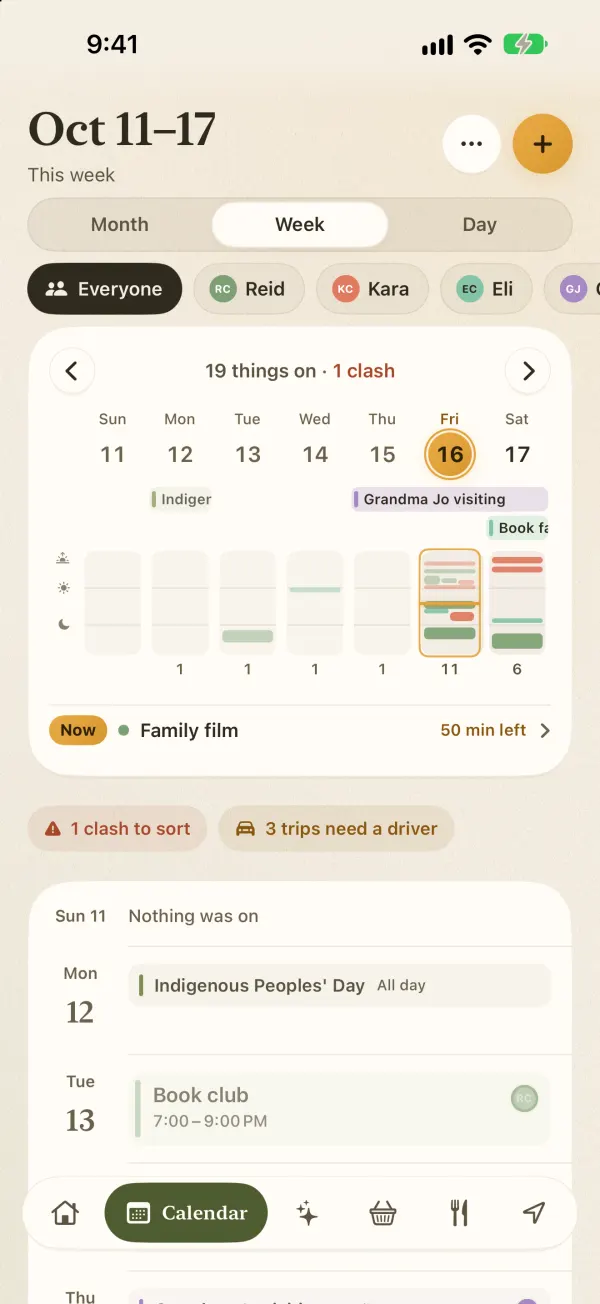
The basics are where you'd expect them. There's one shared calendar with a color for every person, so you can see the whole family at once or tap a name and see just that person's week. There's a shared grocery list the whole family adds to, a to-do list, and a place for recipes. When someone changes something, everyone sees it.
FamSync is free for families of up to four people. That covers two parents and two kids, or one parent, a child and two grandparents. Premium makes room for eight.
What's different
No ads, in either plan
There are no ads in FamSync. Not in the free version, not in Premium, and not later once the app is bigger. Your family's data is never sold, and you can sign in with Apple.
A grocery list that sorts itself by aisle
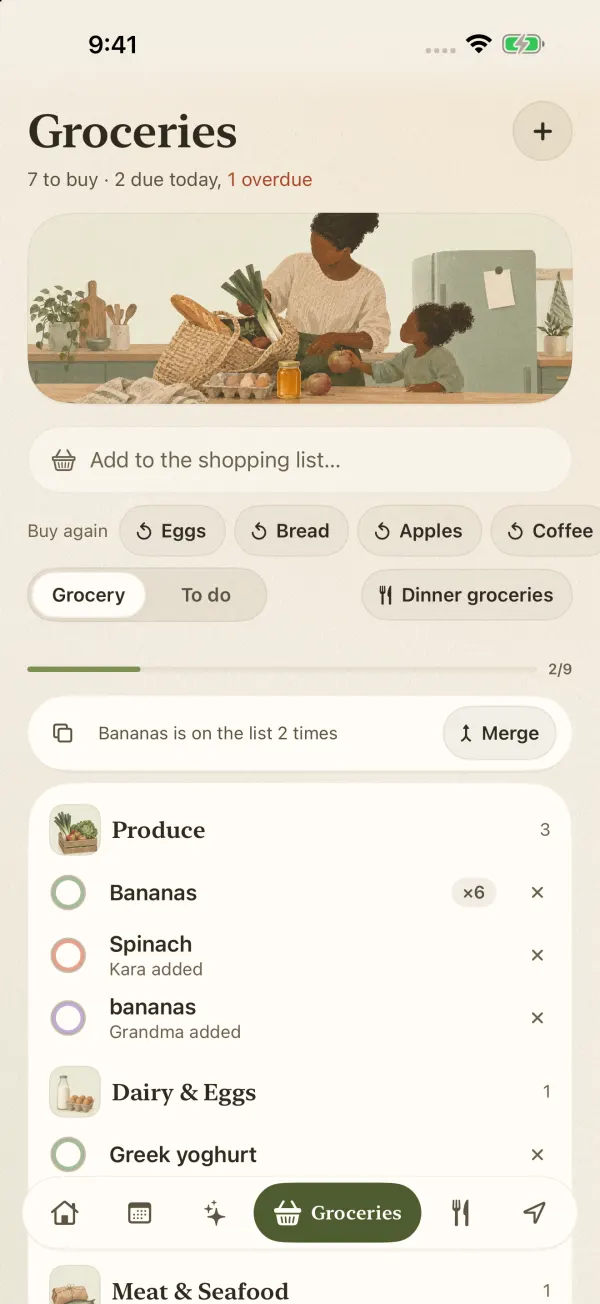
Items group by aisle as you add them: produce, dairy, bakery and the rest. Whoever is at the shop gets round in one lap instead of doubling back for the eggs. FamSync spots doubles ("Bananas is on the list 2 times") and keeps a Buy again row for the things you get every week. You can add hands-free with "Hey Siri, add to groceries in FamSync."
Chores with an allowance built in
Give each chore a due date and an amount. Kids tick it off, you tap Approve or Not yet, and FamSync keeps their streak and a running total of what you owe. It doesn't move money; you pay the way you already do and mark it paid.
Dinner planned around each kid
With Premium, the meal planner builds a week of dinners around what each person likes, dislikes and can't eat. It tells you why it picked each one and lets you swap any night. You can scan a recipe from a photo or paste a link, then send what's missing to the grocery list.
Reminders people can't swipe away
Also in Premium: Remind sends a message straight to someone's phone as a banner that breaks through Focus, or as a call that rings even on silent. "Leave for practice now" lands as a ring, not a notification that sits under forty others.
A place for people without a phone
Little kids and grandparents who don't use a phone still get a profile and a color. They show up on the calendar, the chore chart and the meal plan. They do count toward the four or eight people on your plan.
Where Cozi is still the better pick
I'd rather you pick the right app than pick mine. Stay with Cozi, or choose it, if any of these are true for you.
- Someone in the family uses Android. FamSync is on iPhone and iPad only right now. Cozi works on Android, iPhone and the web.
- You plan from a computer. Cozi has a web version. FamSync doesn't yet.
- You want repeating events and never want to pay. In FamSync, setting up a repeating event (soccer every Tuesday until June) is part of Premium. Single events are free. Check how each free plan handles the things you add most.
- You want something with a long track record. Cozi has more than 400,000 ratings on the US App Store. FamSync is new and made by one person. It's trusted by 100+ families so far, but has only a handful of App Store ratings.
Side by side
| FamSync | Cozi | |
|---|---|---|
| Free version | Yes, up to 4 people | Yes |
| Ads in the free version | None, ever | Yes. Gold is the ad-free plan |
| Events more than 30 days out | Included in Free | Gold feature |
| Repeating events | Premium | Check the current free plan |
| Paid plan | Premium: $5.99 a month or $49.99 a year, up to 8 people | Cozi Gold listed at $39; Cozi Max listed at $79.99 |
| Platforms | iPhone and iPad (iOS 17 and up) | iPhone, Android and web |
| Grocery list | Shared, sorted by aisle, spots doubles, buy again | Shared list; Gold adds a shopping mode |
| Chores and allowance | Free: amounts, parent OK, streaks, running total | Shared to-do lists |
| Meal planning | Premium: plans around each person's likes, dislikes and allergies | Recipe box; meal planning in higher tiers |
| App Store rating | 5.0 from 3 ratings | 4.8 from about 401,000 ratings |
Cozi details are from its US App Store listing and cozi.com, read October 20, 2026. Cozi lists several Gold price points in the App Store; check the app for what you'd pay today.
Moving your family over
Switching apps is the part everyone dreads, so here's the short version. Most families are set up in an evening.
- Download FamSync and create your family. Sign in with Apple if you like.
- Invite everyone by texting them the join code. Add phone-free profiles for the little ones and anyone who won't install an app.
- If your events already live in Google Calendar or Apple Calendar, connect them and events flow both ways. That's a Premium feature, and eligible new subscribers get a free trial.
- Got a paper schedule from school or the team? Snap a photo and every date lands on the calendar (also Premium).
- Retype the grocery list once. Buy again learns the regulars after a week or two.
Whichever app you land on, these 8 rules for a family calendar everyone uses matter more than the tool.
My honest advice: run both apps side by side for two weeks. If your family keeps opening FamSync without being nagged, you have your answer.