 FamSync

I'm Reid. I'm a parent and I make FamSync. The chore chart started because a paper chart on the fridge kept losing to a magnet and a felt-tip pen that had run dry. Here's how it works, plus a list of chore ideas by age you can use with any app or none.
How the FamSync chore chart works
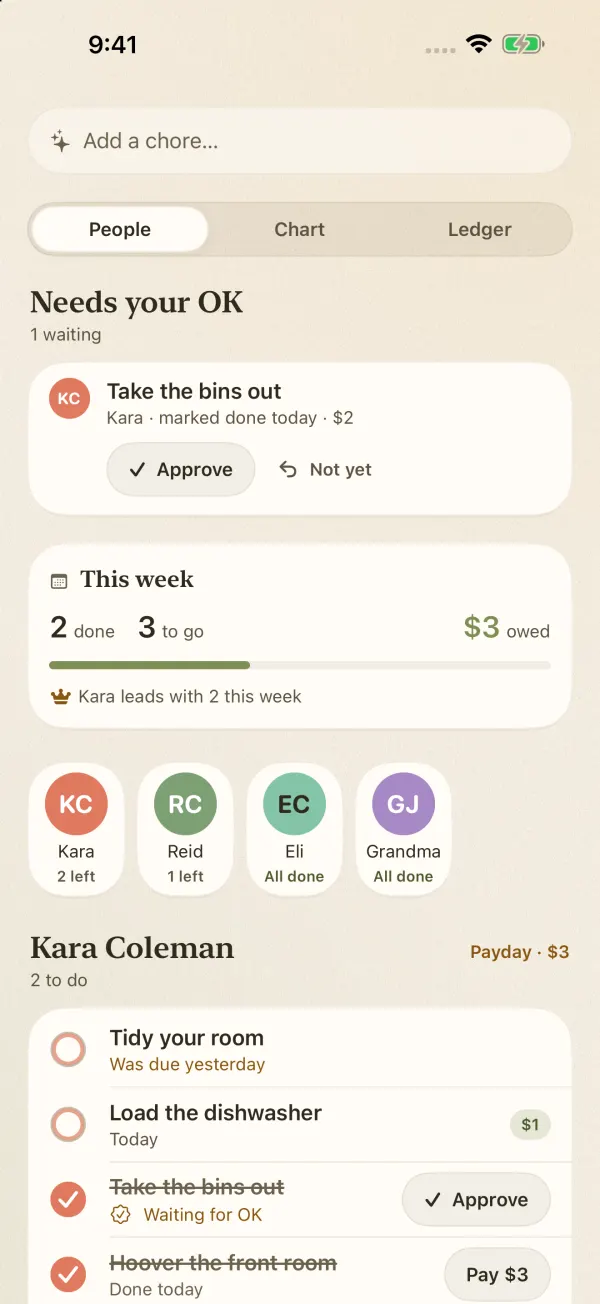
The chores screen has three views: People, Chart and Ledger.
- People shows each family member with how many chores they have left today, and what's waiting for your OK at the top.
- Chart is the classic grid: who's doing what this week.
- Ledger is the money side: what each kid has earned and what you've already paid.
When a kid marks a chore done, it lands in Needs your OK. You tap Approve, or Not yet if the "tidy room" was a pile shoved under the bed. Approved chores add to their total. When it's payday, tap Pay and it's cleared.
Streaks, and a little friendly competition
FamSync keeps a streak for each kid and shows who's leading this week. Some kids care a lot about a streak. Others couldn't care less, and that's fine; the chart still works as a plain list.
No debit card required
FamSync doesn't move money. There's no card to order, no bank to link, and no monthly fee for the chores. You pay your kids however you already do, cash in a jar or a transfer, and tap Pay so the ledger stays right. If you specifically want a kids' debit card with spending controls, apps like Greenlight and BusyKid are built around that. FamSync is for keeping track.
Little kids without a phone
A four-year-old can still have chores. Add them as a phone-free profile with their own color, and you tick their chores off for them. Grandparents who help out can be added the same way.
Chore ideas by age
Every family is different and you know your kids. These are starting points that many parents find realistic. For a fuller list from age 3 to 17, with weekly allowance amounts by age, see chore charts by age.
Ages 3 to 5
- Put toys back in the bin before dinner
- Put dirty clothes in the hamper
- Feed the pet, with a grown-up measuring
- Set out napkins and spoons
Ages 6 to 8
- Make their bed (roughly counts)
- Empty the small bins into the big one
- Match socks from the clean laundry
- Clear their own plate and wipe their spot
Ages 9 to 12
- Load or unload the dishwasher
- Take the bins out on collection day
- Vacuum one room
- Help plan one dinner a week and put the ingredients on the grocery list
Teens
- Do their own laundry start to finish
- Cook dinner one night a week
- Mow the lawn or clean the car
- Pick up a younger sibling from practice
Three ways families handle allowance
There's no right answer here, and FamSync works with all three.
- Paid per chore. Every chore has an amount. Simple, and kids see the link between work and money right away. In FamSync, set the amount on each chore.
- Base chores plus paid extras. Some jobs are just part of living in the house and earn nothing. Bigger jobs, like washing the car, earn money. In FamSync, leave the amount off the everyday chores and add one to the extras.
- A flat weekly amount. A set allowance, with chores expected alongside it. Use the chart and streaks for the chores and pay the flat amount on payday.
Making a chore chart stick
- Start small. Two chores a kid for the first week. Add more once the habit is there.
- Give due dates, not deadlines. "Today" is clearer than "this week".
- Approve quickly. A chore that sits waiting for your OK for three days teaches kids the OK doesn't matter.
- Pick a payday and keep it. Same day every week. The ledger shows exactly what you owe.
Everything else lives in the same app
Chores sit next to the shared family calendar, the grocery list and the meal plan, so kids open one app, not four. The free plan covers up to four people. Premium adds room for eight, and extras like reminders that ring even on silent, which are handy for a teenager who "didn't see the message".