 FamSync

I make FamSync, one of the apps on this list. That's a conflict of interest and you should weigh what I say with it in mind. I've tried to be fair: every app here is good at something, and for plenty of families FamSync isn't the right pick. Prices and ratings are from each app's US App Store listing or website on October 20, 2026. They change, so check before you pay.
How I compared them
A family organizer only works if everyone opens it. So beyond features, I looked at five practical questions.
- Does it work on everyone's phone? One Android user can rule an app out.
- What does the free version really include? Including ads and limits.
- What does the paid plan cost a whole family? Some charge per person.
- Does it go beyond the calendar? Chores, groceries, meals.
- Will a teenager or a grandparent actually use it?
At a glance
| App | Free version | Ads in free | Paid plan (US) | Platforms |
|---|---|---|---|---|
| Cozi | Yes | Yes | Gold listed at $39; Max at $79.99 | iPhone, Android, web |
| FamilyWall | Yes | No ad label on the App Store | $7.99 a month or $44.99 a year | iPhone, Android |
| TimeTree | Yes | Yes | $4.49 a month or $44.99 a year | iPhone, Android, web |
| Skylight app | Yes | No ad label on the App Store | Calendar Plus $79 a year | iPhone, Android, plus Skylight displays |
| Google or Apple family calendar | Yes, fully free | No | None needed | Google: everywhere. Apple: Apple devices |
| FamSync | Yes, up to 4 people | No, ever | $5.99 a month or $49.99 a year, up to 8 people | iPhone, iPad |
From each app's US App Store listing and website, read October 20, 2026. Several apps list more than one price point; the app itself shows what you'd pay.
Cozi
Best for mixed iPhone and Android families who want the classic- Good at
- Simple shared calendar, shopping and to-do lists, and a recipe box, on iPhone, Android and the web. A long track record, with about 401,000 ratings on the US App Store at 4.8 stars.
- Watch out
- The free version has ads. Its App Store listing names adding, editing and viewing events more than 30 days ahead as a Gold feature.
- Price
- Free with ads. Cozi Gold is listed at $39 in the App Store and on cozi.com; Cozi Max at $79.99.
FamilyWall
Best for families who want lots of tools in one app- Good at
- A free shared calendar, shopping and task lists, recipes, family messaging and a photo gallery. Premium adds a meal planner, a budget, document storage, Google and Outlook calendar sync and a locator with arrive and leave alerts. 4.8 stars from about 24,000 ratings.
- Watch out
- The best parts (meal planner, location, calendar sync) are Premium, and there's a lot of app to learn.
- Price
- Free, or Premium at $7.99 a month or $44.99 a year, after a 30-day trial.
TimeTree
Best for a shared calendar and nothing else- Good at
- Sharing calendars with several groups at once: family, a team, a book club. Chat on each event, memos, photo albums and a web version. 4.9 stars from about 93,000 ratings.
- Watch out
- The free version shows ads. It's a calendar, so chores, groceries and meals live elsewhere.
- Price
- Free with ads, or Premium at $4.49 a month or $44.99 a year.
Skylight app
Best if you have, or want, a wall calendar display- Good at
- Running a Skylight Calendar on the kitchen wall, with chores and routines everyone can see from across the room. Great for kids too young for phones. 4.8 stars from about 52,000 ratings.
- Watch out
- It's built around Skylight's hardware, and recipe books and meal plans are a paid Plus feature.
- Price
- Calendar Plus is listed at $7.99 a month or $79 a year, on top of the display itself.
Google Calendar or Apple's Family calendar
Best free option with no new app- Good at
- Costing nothing and needing nothing new. A Google family group comes with a shared Family calendar, and Apple Family Sharing creates a shared Family calendar in iCloud. Both cover up to six people.
- Watch out
- No chores, no allowance, no meal planning, and it's easy for kids' events to get lost among work meetings. Everyone needs an account, so little kids and some grandparents are left out.
- Price
- Free.
FamSync
The one I make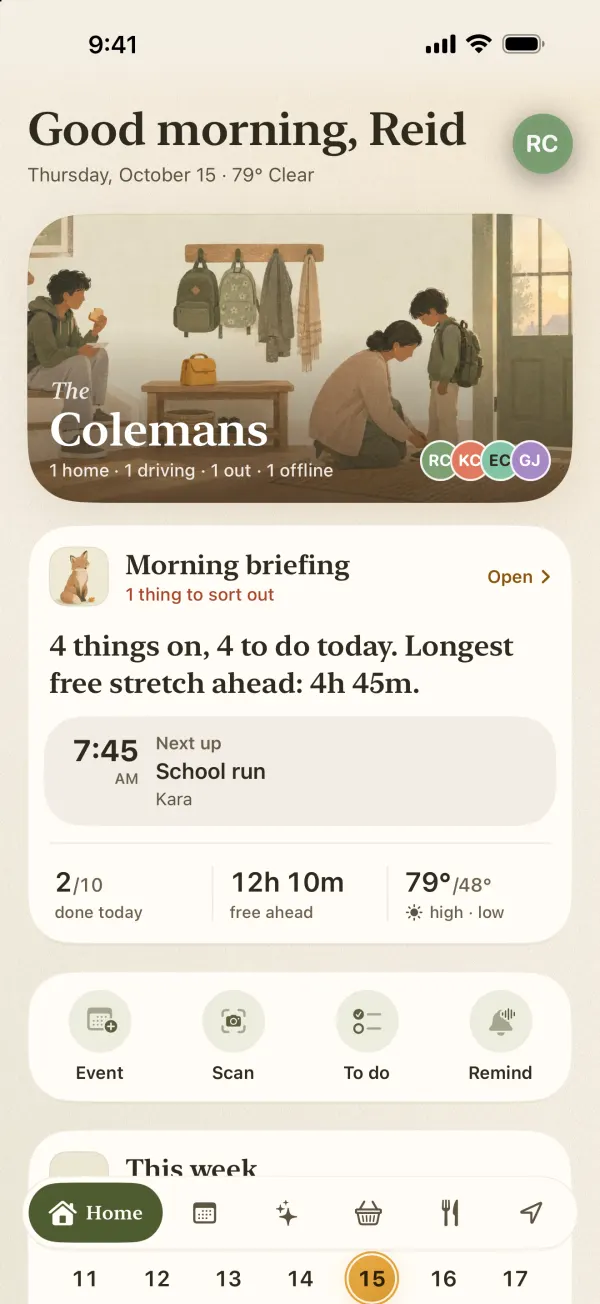
- Good at
- Everything in one calm, ad-free app: a shared calendar with a color per person, chores with allowance and parent OK, a grocery list that sorts by aisle, and phone-free profiles for little kids and grandparents, all free for up to four people. Premium adds a meal planner that plans around each kid's likes, dislikes and allergies, reminders that ring even on silent, Apple and Google Calendar sync, photo scanning of paper schedules, and a live family map with drive summaries (route, distance, top speed, hard braking and phone pickups). Teen drivers can see their own drives are logged, so nothing is hidden from them.
- Watch out
- iPhone and iPad only, no web version, and it's new: trusted by 100+ families so far, but only a handful of App Store ratings, and one developer. Repeating events, calendar sync and the meal planner are Premium.
- Price
- Free for up to 4 people. Premium is $5.99 a month or $49.99 a year for up to 8, with a free trial for eligible new subscribers.
Two specialist picks
For co-parents who need court-ready records
If your co-parenting plan needs message logs or records a court will accept, use an app built for that. OurFamilyWizard lists its Essentials plan at $149.99 a year per parent. TalkingParents starts at $7 a month. None of the general organizers above, FamSync included, are designed for that job. I wrote more on this in a shared calendar for co-parents.
For dinner on its own
If all you need is a meal planner, a dedicated recipe app may suit you better than a family organizer. If the hard part is picky kids, here's how FamSync plans around them.
So which one should you choose?
- Someone uses Android: Cozi, FamilyWall or TimeTree.
- You just want a shared calendar for free: Google's or Apple's Family calendar, or TimeTree if you don't mind ads.
- You want a screen on the kitchen wall: Skylight.
- Lots of features and you'll pay for them: FamilyWall.
- All-iPhone family that wants calendar, chores, groceries and dinner in one ad-free app: try FamSync. If it's not for you, coming from Cozi or anywhere else, the free plan costs you nothing to find out.